


TL;DR: Livestreams drive discovery, but they vanish fast when VODs go missing. Partnier’s Stream Snapshots gives publishing teams livestream coverage tracking that sticks. The moment a channel in our Global Panel goes live, Partnier captures timestamped images, logs stream title/status changes, and flags mid-stream category switches. You get a verifiable, visual audit trail to validate deliverables, scan hours in minutes, and support compliance. Pair Snapshots with AI Content Analysis & Transcripts for the complete live plus recorded picture.
Have questions? Book a chat with our account management team.
The Livestream Blind Spot
If you need livestream coverage tracking you can defend in a wrap report, Partnier’s Stream Snapshots gives you timestamped images of live sessions, plus title changes and mid-stream switches. Even when VODs disappear, you keep proof.
Livestreaming is amazing for discovery and community. It is also easy to lose. A creator goes live, vibes with chat, then forgets to archive. Or the replay gets muted, trimmed, or removed. Rewatching hours of footage to answer one question, “did they actually stream our game and for how long,” is not a workable plan for busy teams.
That is the gap Stream Snapshots closes.
Across a representative Global Panel of opted-in gaming channels, Partnier detects when a channel goes live and immediately begins building a visual, time-indexed record of what is on screen. You get exactly when your game appeared, how it was framed, and how long it ran. Your sponsored activations and organic wins both leave a trail you can trust.
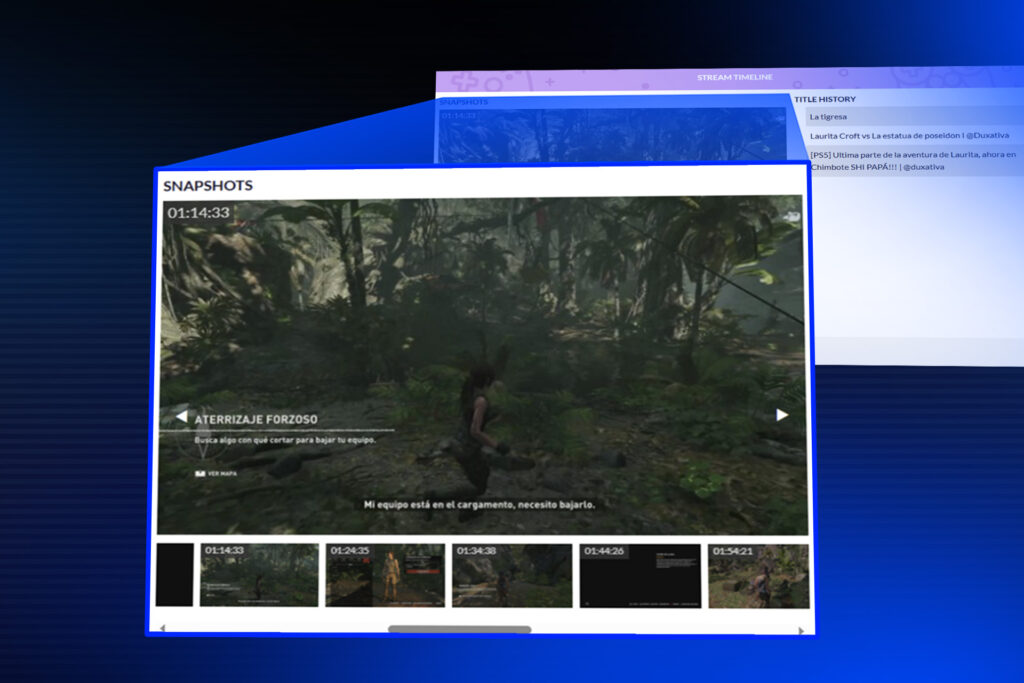
What Stream Snapshots Captures
When a channel in our Global Panel goes live on Twitch, the platform pings us instantly. From that moment, Partnier automatically:
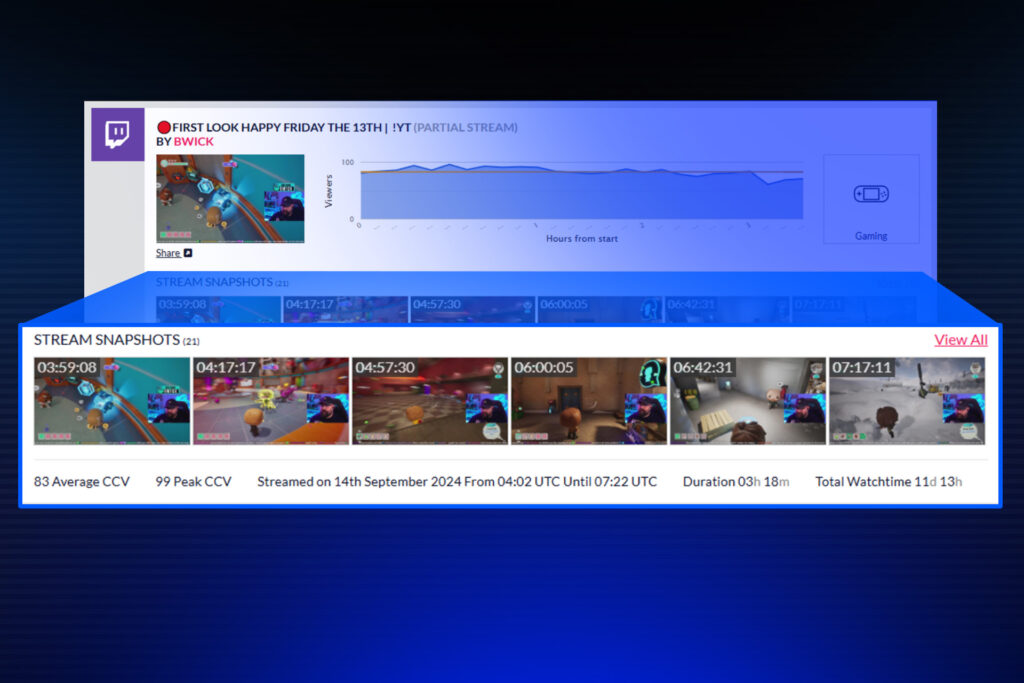
- Captures timestamped snapshots at intervals across the entire stream, building a time-indexed visual history
- Tracks Stream Status changes (e.g., title updates) so you can see how the creator framed the content in the moment
- Detects mid-stream switches if a creator pivots categories and starts/stops playing your game halfway through, you won’t miss it
Working directly with an influencer outside of Partnier? No problem. If you use our free campaign management tools to distribute codes and the influencer links their socials, stream tracking (including snapshots) activates automatically, even if they weren’t previously in the Global Panel. That means your sponsored activations and organic collaborations both benefit from the same reliable coverage record.
Why This Matters for Publishing Teams
You get a durable, audit-friendly view of live activity without the pain of full VOD review:
- Verify deliverables with confidence. Confirm your game was streamed, when coverage began and ended, and how long it ran.
- See how you were presented. Review stream title/status changes to understand creator intent and messaging in context
- Capture the uncapturable. Even if the creator doesn’t archive the VOD, you retain a visual record of coverage
- Go faster. Snapshots let you scan hours of live activity in minutes to find the moments that matter
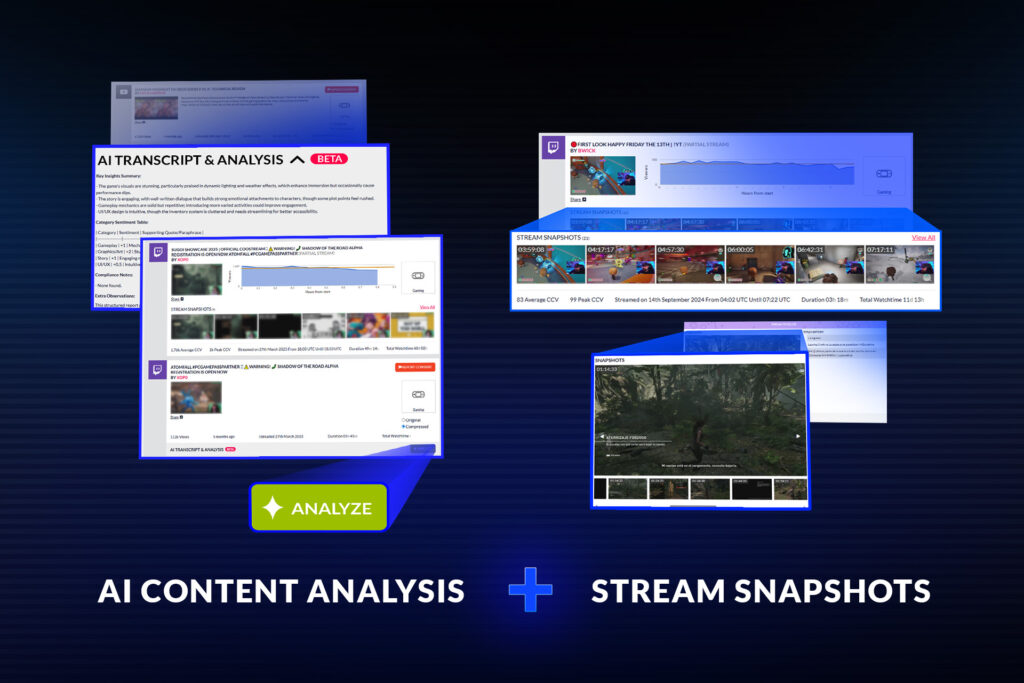
- Complete the picture. Pair with AI Content Analysis to combine live (Stream Snapshots) and recorded (VOD/YouTube) insights in one workflow
This isn’t experimental or a tech demo.
Stream Snapshots have been in active development for nearly four years, with a growing archive of historical live data already available to clients. It’s built to scale with your campaigns.
How It Works (Step-by-Step)
- Go live signal: When a channel begins streaming, we receive a platform callback instantly
- Continuous capture: Partnier takes timestamped snapshots at set intervals throughout the stream, from go-live to sign-off.
- Title/status tracking: We log Stream Status changes as they happen (e.g., new title, added tags), giving you a narrative of how the stream was framed
- Mid-stream detection: If a creator switches categories or games mid-stream, the system flags the transition so you see when your game appears
- Automatic activation for linked creators: For Partnier campaigns, creators who link socials trigger the same tracking automatically
View, filter, export: Snapshots appear in your dashboard alongside other coverage items. Scan, filter by time window, and export what you need for reporting
Practical Scenarios
Sponsored launch weekend
You’ve booked 30 creators for a launch push. A few forget to archive their VODs; others change the stream title mid-way. Stream Snapshots gives you the exact time window for each creator’s coverage, the title/status at that moment, and snapshot proof. So your wrap report is clean, fast, and defensible.
Organic discovery during a sale
You’re running a themed sale and want to understand true live reach. Not every stream deserves a full watch. Snapshots let you scan hundreds of hours of live activity in minutes, surface where your game appears, and focus your attention (and future outreach) on the creators who meaningfully featured you.
Mid-stream category switches
A creator streams “Just Chatting” for an hour, then switches to your game for a segment before hopping to a different title. Traditional tracking often misses or misattributes this. Stream Snapshots pins the switch and provides visuals that show exactly when your game was on screen.
Talent/agency verification
Agency-run campaigns need crisp proof of performance. Snapshots become your standard deliverables. A time-boxed, visual audit trail that aligns neatly with contracts and payment milestones.
How It Complements AI Content Analysis & Transcripts
Earlier we introduced AI Content Analysis & Transcripts to help teams understand recorded content faster. Auto-transcribing videos and surfacing sentiment, actionable feedback, and compliance cues inside Coverage View. Stream Snapshots sits upstream of that, giving you live visibility while the action happens, and ensuring that even if a VOD never exists, you’re not blind to coverage. Together they provide a live + recorded picture: snapshots to prove and find, transcripts to understand and act.
What About Privacy, Consent, and Compliance?
- Opt-in panel: Our Global Panel is composed of opted-in gaming channels. That’s the cornerstone that enables fast, reliable live tracking at scale
- Creator-linked campaigns: When you distribute codes via Partnier and a creator voluntarily links their social accounts, they activate the same tracking benefits automatically. No extra setup.
- Compliance support: Stream titles and timing are crucial context for sponsorship disclosures. Snapshots preserve how coverage was framed in the moment, helping you audit compliance alongside our other monitoring and analysis tools.
Reporting & Workflow Tips
- Use snapshots as anchors. When assembling a report, start with snapshot timestamps to define the coverage window; then enrich with metrics (concurrent viewers, chat highlights, etc.) where available
- Create issue flags fast. Spot mislabelled titles (e.g., wrong DLC name) or missing #ad disclosures quickly; message creators while they’re still live
- Prioritise follow-ups. If snapshots show your game getting a significant live segment, route that creator into creator programs or your partner program pipelines.
- Coordinate with PR/Community. Snapshots can identify “surprise” creators who discover your game organically, perfect candidates for press lists, community invites, or DLC keys.
FAQs
Does Stream Snapshots replace VOD review?
No. It makes live verification simple and fast, and ensures you retain proof if a VOD is missing. For deeper qualitative understanding, pair snapshots with VOD review and (where available) AI Content Analysis & Transcripts.
What platforms are supported?
We maintain a multi-platform Global Panel across Twitch, YouTube, and others. Twitch live tracking uses instant callbacks; additional platforms are covered through our broader monitoring infrastructure.
Is this new?
Yes, but actually… no. Stream Snapshots have been in active development for nearly four years, with a growing archive already helping clients audit live coverage historically and at scale.
Does this help content creators?
Yes. Stream Snapshots gives you a verifiable, time-stamped record of your livestream segments, even if the VOD is trimmed, muted, or disappears later. That means you can point publishers to concrete proof of coverage (including title/status at the time), reducing back-and-forth on deliverables.
Getting Started
If you already use Partnier: Stream Snapshots will appear alongside your live coverage items. Open a title’s coverage, filter to the date/time window you care about, and scan snapshots to confirm deliverables or spot opportunities. Pair with Coverage Monitor to complete the live + recorded view for your report.
If you run creator programs through Partners Page or distribute keys via GiftingBot: Encourage creators to link their socials. That simple step enables automatic snapshot tracking.
If you’re evaluating Partnier, Stream Snapshots is one part of our unified publishing workflow, from first mention to launch to live ops, designed to reduce manual effort and make proof-of-impact effortless.
See It in Action
Want to see Stream Snapshots on your campaigns? Book a demo with our team and we’ll show you: how snapshots populate in real time, how mid-stream switches are flagged, and how to assemble export-ready proof in minutes. No full VOD scrub required.
We can also demonstrate how snapshots pair with our Coverage Monitor and AI Content Analysis to give you a complete, end-to-end view of creator activity.